
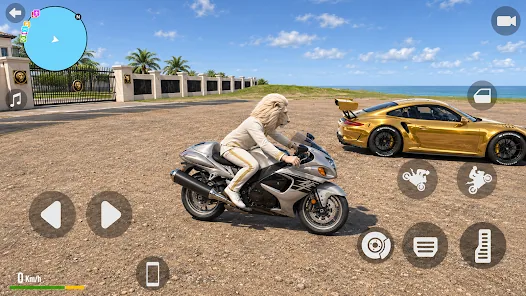
The developer's description says the in-game phone includes a Vehicle app that can call cars, bikes and aircraft to Sheru Bhai's location. The same listing describes a broad selection of vehicles for exploring the island.
How the Vehicle app is described
Open the in-game phone and look for the Vehicle app. Skorax says it can call a vehicle to your location, after which you can drive or fly around the island. The public description does not show every menu step or a complete control diagram, so follow the prompts in your current version.
Cars listed by the developer
The Google Play description names 15 luxury cars, ranging from supercars and hypercars to a large luxury SUV and a formula racing car. It also specifically calls out two vehicles in Sheru Bhai's own designs: a white, black and gold lion hypercar, and a diamond-and-gold supercar.
The listing also mentions a luxury car showroom, where a gold racing car turns on its stand. It does not publish a complete catalogue of every model name, so this guide does not invent a model-by-model list.
Superbikes and aircraft
The developer lists superbikes as well as several aircraft types:
- Fighter jets.
- A large jet.
- A propeller plane.
- A helicopter.
Skorax’s November update note on Google Play also names a Money Helicopter. The update note gives the feature name but does not explain its controls or unlock conditions. See the latest update notes for the exact official wording.
Where can you explore?
The store description mentions highways, hill roads, sandy beaches, a beach island and an airport. It also lists a village, stadium and police station. These locations give you different settings to visit by road or air.
The listing says the weather can change automatically or be selected in Settings, including day, night, clouds and rain. This can change the atmosphere while you explore, but the developer does not publish a recommended route or a full map with coordinates.
A sensible first ride
If you are new to the game, start with a road vehicle so you can get used to the prompts in your current build. Try a few of the roads and locations listed above, then return to the Vehicle app and look at the other categories. When you are ready, try an aircraft and follow its on-screen prompts.
These are general orientation suggestions based on the features the developer lists, not hidden gameplay tricks or a tested speedrun route.
What the public listing does not specify
Skorax lists vehicle categories and says the phone can call vehicles to your location. It does not publish a full steering, accelerator, brake or flight-control map, a complete model inventory, or detailed unlock requirements. The game may change between updates, so use the controls shown in your current version. Do not rely on button combinations copied from a different simulator.
The store description also does not provide official top-speed figures, handling ratings, fuel limits or a ranking of the best vehicle. For that reason, this guide does not label one car or aircraft as the fastest or best. If you want to compare vehicles, try them in your installed version and use the in-game prompts as your reference. The named categories above are the details the developer has actually published.